MultiWav Splitter · Behringer X32 / WING
Turn X-LIVE multitracks into named WAV stems in minutes.
Split 32- or 64-channel recordings from your SD card into individually named tracks, ready to drop into any DAW. Files split at the 4 GB limit are joined back together automatically.
14-day free trialNo credit cardAlso on Windows 10/11
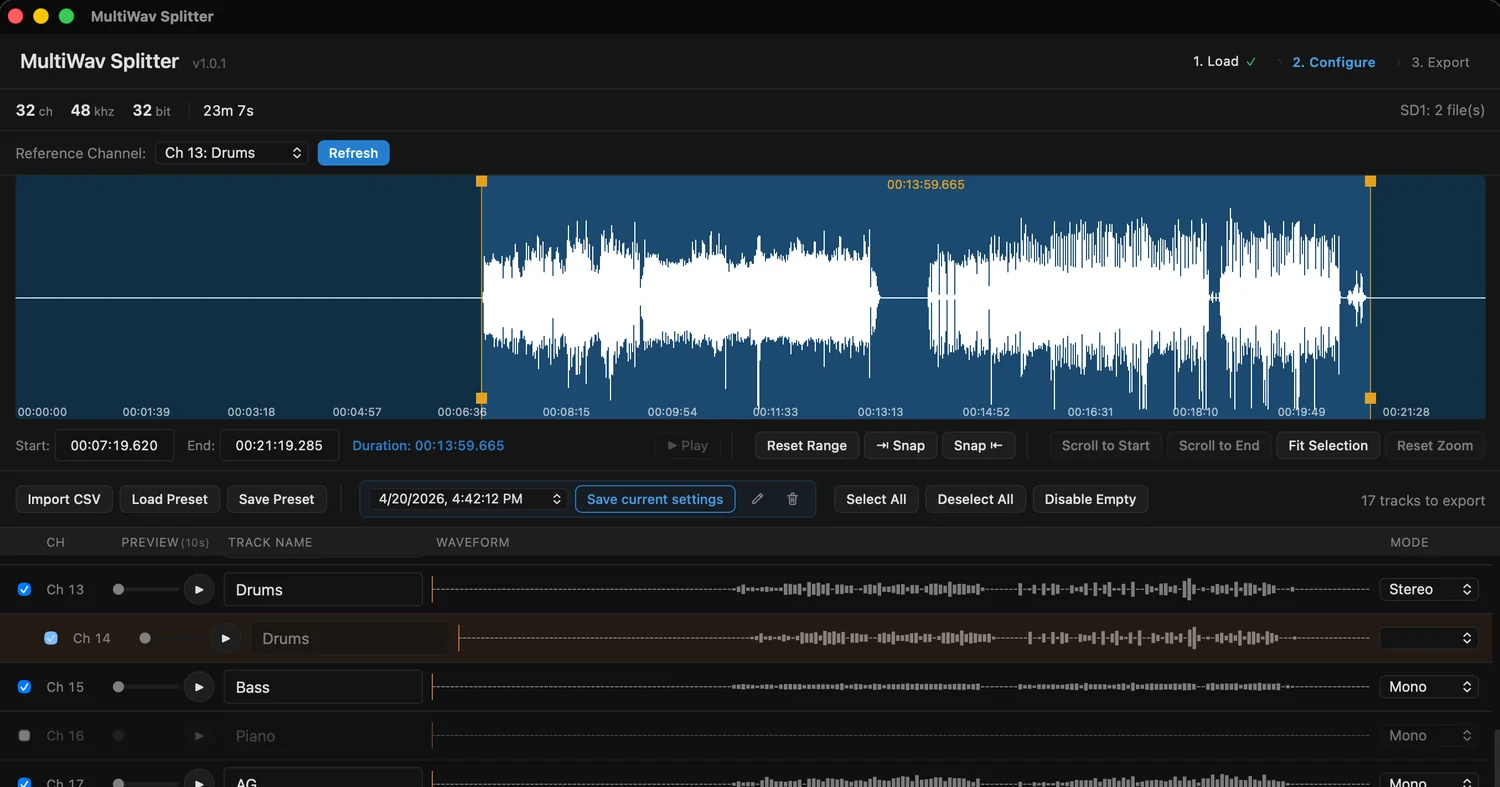
- Drums.wavstereo
- Bass.wavmono
- AG.wavmono
- Click.wavmono
- Keys1.wavstereo
Free web tools
Runs in your browser, nothing to install
How it works
Three steps, exactly as they appear in the app
Choose the SD card folder
Channel count (32/64), sample rate, and split files are detected automatically. SE_LOG.BIN is used to verify the recording.
Set names and range
Set track names, mono/stereo, and the range to export. Drop silent channels in one click with Disable Empty, and load a preset for your weekly setup.
Export one WAV per track
You get a folder of named WAV files. Drag them into your DAW and start mixing.
Features
Less busywork after every live recording
Automatic 4 GB split-file merging
Files split by the FAT32 limit are joined in order and exported as one continuous track.
X32 · WING, 32/64 channels
Reads SD1/SD2 recordings from the X-LIVE recorder at the right channel count.
Stereo pairs
Link two channels and export them as a single stereo WAV.
Presets · Import CSV
Save track names, modes, and pairs, then reuse them next week. Pull track names from a CSV in one go.
Tag markers · waveform range
Jump to the Tags you dropped while recording, or set start and end points right on the waveform.
Preview · auto-update
Check each track with a 10-second preview. New versions install from inside the app.
Why a dedicated app
Compared with splitting in your DAW
| Task | In your DAW | MultiWav Splitter |
|---|---|---|
| 4 GB split files | Import each file and line them up on the timeline | Merged automatically |
| Track names | Type 32–64 names every time | One step with presets or CSV |
| Stereo channels | Combine two tracks by hand | Pair them, get one stereo WAV |
| Unused channels | Listen to each one and delete it | One click with Disable Empty |
| Song-by-song ranges | Cut them on the timeline | Set from Tag markers or the waveform |
Pricing
Buy once, keep it for good
No subscription. Try it for 14 days, then decide. The trial doesn't need a credit card.
- macOS (Apple Silicon · Intel) · Windows 10/11
- X32 · WING, 32/64 channels
- In-app auto-updates
- One license key, up to 2 of your computers
Purchases and downloads are subject to the Terms and Conditions.
FAQ
Questions before you buy
What can I do during the trial?
Every feature is available for 14 days. No credit card required.
What happens after 14 days?
You need a license key to keep using the app. Enter the key you receive after purchase under "Activate License" in the app.
How many computers can I use one license on?
You can activate it on up to two personal computers that you own. License keys can't be shared or resold.
Can I get a refund?
Because of the 14-day free trial, all sales are generally final. If you run into a technical issue that can't be resolved, refund requests are reviewed case by case through our payment processor, Lemon Squeezy.
Does it handle 64-channel WING recordings?
Yes. 32- and 64-channel recordings are detected automatically and split per channel.
The full license, trial, and refund terms are in the Terms and Conditions. For installation issues, see the product FAQ.
About
Built for real weekly work in live sound
These tools started as a way to cut the repetitive work that came up every week in live sound and worship. The goal is to save time for engineers and volunteers who wear many hats.